

5 Common Cloud Migration Challenges (and How to Solve Them)
Quick answer: Cloud migrations fail in predictable ways. Five friction points come up consistently across mid-to-large infrastructure projects:
- Exposed data during transfer
- Legacy applications that weren’t built for the cloud
- Cost overruns that compound before anyone notices
- Downtime risk during cutover
- Skills gaps that stall the project
Cloud migration sits at the top of nearly every IT roadmap, yet the execution record is uneven at best. Around 38% of migrations exceed their original budget, with the average overrun running 23% above initial estimates. The same friction points come up on project after project,
These are the five most common migration challenges with specific guidance on what to address and when.
1. Exposed Data During Transfer
The window between environments is one of the highest-risk periods in any cloud migration, and it’s where compliance exposure is most likely to be underestimated.
The Risk Window
Data in transit is exposed to interception if encryption standards aren’t enforced end-to-end, and access controls that were appropriate for on-premises infrastructure frequently don’t translate cleanly to cloud architecture. Organizations routinely underestimate compliance exposure during this phase: HIPAA, PCI-DSS, and similar frameworks require continuous coverage, not just pre- and post-migration audits.
What to Do About It
Enforce encryption in transit as a baseline requirement (TLS 1.2 minimum) and implement least-privilege access policies before the move begins. More importantly, map your compliance obligations to each stage of the migration timeline. Treating compliance as a single checkpoint at the end is how organizations end up with findings they can’t quickly remediate.

2. Application Incompatibility
Legacy application compatibility is the challenge that most consistently blows up migration timelines, usually because it wasn’t fully scoped before the project started.
Why Legacy Apps Create the Most Delays
Systems built for on-premises environments often rely on hardware dependencies, static IP configurations, or tightly coupled components that have no clean equivalent in cloud architecture.
Lift-and-Shift vs. Refactoring
The lift-and-shift approach gets applications into the cloud faster, but frequently leaves you with the same technical debt in a new location, along with performance problems that weren’t visible before. Refactoring resolves those issues but requires significantly more time and specialized development capacity.
Start with a thorough application inventory. Categorize each workload by migration complexity, and identify which ones genuinely need refactoring versus rehosting before you sequence the work. Moving compatible workloads first gives the team time to develop the skills and patterns needed for harder migrations later.
3. Cost Overruns That Compound Before Anyone Notices
Fifty percent of IT leaders cite spend management as the top migration challenge, and the budgeting problems tend to follow a recognizable pattern.
Where the Budget Actually Goes
Overruns in cloud migrations are rarely caused by one large miscalculation. The more common scenario is several underestimated line items that compound over the course of the project:
- Egress fees that weren’t modeled in the original budget
- Over-provisioned resources that nobody resized after go-live
- Legacy licensing costs that persist well after cutover

Building FinOps Into the Plan
Projects that delay optimization after migration often see cloud spending creep 15 to 25 percent beyond anticipated run-rate. Cloud financial management needs to be part of the migration plan from day one, not addressed after go-live. Four practices that tend to get skipped:
- Tag resources from the start
- Set spend alerts before cutover, not after
- Assign someone with actual accountability for cost governance throughout the project
- Schedule rightsizing checkpoints at 30 and 60 days post-migration to catch drift before it compounds
4. Downtime Risk During Cutover
Downtime risk is manageable, but only when rollback planning and testing get the same attention as the migration itself.
Reducing Blast Radius
Unplanned downtime during migration erodes confidence in the project when stakeholder buy-in matters most. Phased migration approaches reduce exposure by limiting the impact of any single failure, but they only work when rollback procedures are documented and tested in advance.
Testing That Reflects Reality
Production-mirrored testing environments are worth the cost. Issues that would have surfaced as incidents in production get caught during dry runs instead. For organizations with high availability requirements, blue-green deployments allow cutover with near-zero downtime by maintaining two parallel environments until the new one is fully validated.
Testing environments should reflect production configurations closely enough to surface real failure modes, not an idealized version of the stack.

5. Skills Gaps That Stall the Project
The skills gap is the challenge organizations most consistently underestimate, often because they don’t identify it until the project is already in motion.
Why Generalist Staff Aren’t Sufficient
Generalist IT staff can support a migration operationally, but they shouldn’t be leading it. Cloud migration requires practitioners who have worked through the specific technical challenges of the platforms involved. Eighty percent of organizations report that lack of internal cloud expertise is their top barrier to migration success.
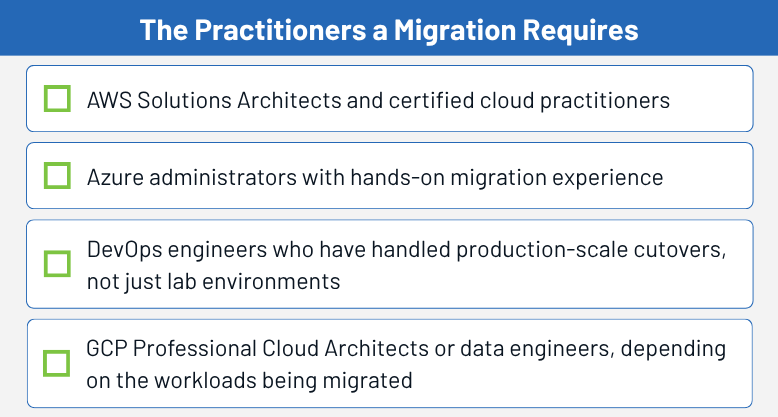
Certifications are a useful baseline, but hands-on migration experience is what separates engineers who can design a cloud architecture from those who can execute one under real project pressure. Skills audits early in the planning process surface gaps before they become scheduling problems.
For most mid-to-large organizations, some combination of upskilling existing staff for support roles and bringing in specialists for the migration phases is the practical path forward. How you staff the migration also determines how well you’re positioned once it’s done.
What Happens After Go-Live
Migrations that close without a post-migration governance plan in place tend to unravel quietly. Cost sprawl, security policy drift, and monitoring blind spots don’t surface until something breaks, and by then the team that executed the migration has often moved on.
Build the governance structure before go-live, not after. At minimum, that means cloud-native monitoring configured to your actual environment, with security policies and cost controls that have defined owners rather than shared inboxes.
Two operational habits in particular tend to get skipped:
- Configuration drift checks built into regular operational cycles
- Review cadences with an assigned owner, not a shared inbox
Teams that inherit a migration without these controls spend months reconstructing visibility they should have had from the start.
How GDH Helps You Navigate Cloud Migration Challenges
GDH places cloud engineers and architects with direct migration experience across AWS, Azure, and GCP. We work with IT decision-makers to identify the specific skill requirements for each phase of a cloud initiative and match qualified candidates accordingly.
If you’re planning a migration or working through one now and have gaps in your technical team, contact GDH for the right talent, before your project stalls.